

Reporting for your veterinary practice
Your reminders went out Monday.
How many of them turned into booked visits?Reminders went out Monday. How many became bookings?
Reporting is veterinary analytics for US vet practices: reminders, calls, bookings, ads, reviews and payments counted on a dashboard built for you. Once a month, a short report from our team explains what moved.
- Reminders counted to bookings
- Every caller's source

Live in 14 daysA dashboard for your practice
- Calls by hour
- Reminder, confirmation and no-show results
- Ads credited for new clients
- Calls counted per campaign
- Your month, summed up by our team
Monday, 9 a.m. The owner wants to know if last week's reminders worked, what the Facebook ads brought in and how many calls rang out at lunch. The manager has three logins and a guess. Below, the same Monday with every number counted.
What gets counted today
Tallied live, all week
The summary in your inbox monthly


Setting up
Your dashboard counting by day 14
We build it around what you watch.


On a call with the owner and your manager, we list what you want to see each month: reminder results, no-shows, missed calls, new clients by source. Then we give your listing, site and each ad a tracking number.
Next we build your dashboard around that list, connect it to your phones, texting, booking and payments, and set the date your monthly report goes out and who receives it.
From day 14, every call, reminder, booking and review is counted as it happens. Your manager gets a login and a short walkthrough, and the first monthly report lands after your first full month.
Questions answered
Six questions the numbers now answer
Owners ask them at every monthly meeting, and managers used to answer from memory or three vendor logins. Here's what each one shows now.
Month end
Reports already written
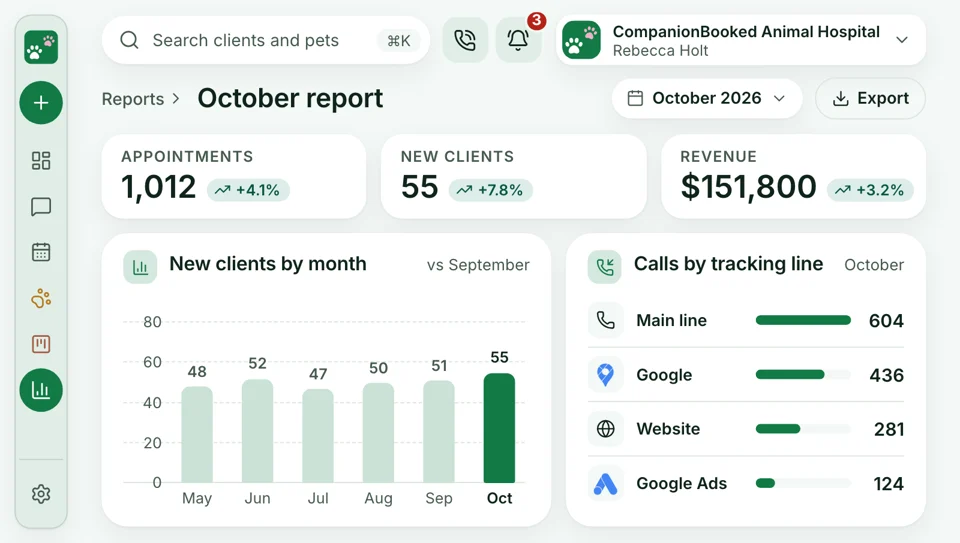
The owner asks how last month went, and the manager spends an evening pulling numbers from four logins. Now that report arrives from our team, ready to read.
- Sent on the first of every month, without asking.
- Short, readable, and ends with next month's changes.
Phone rush
Missed calls, by the hour
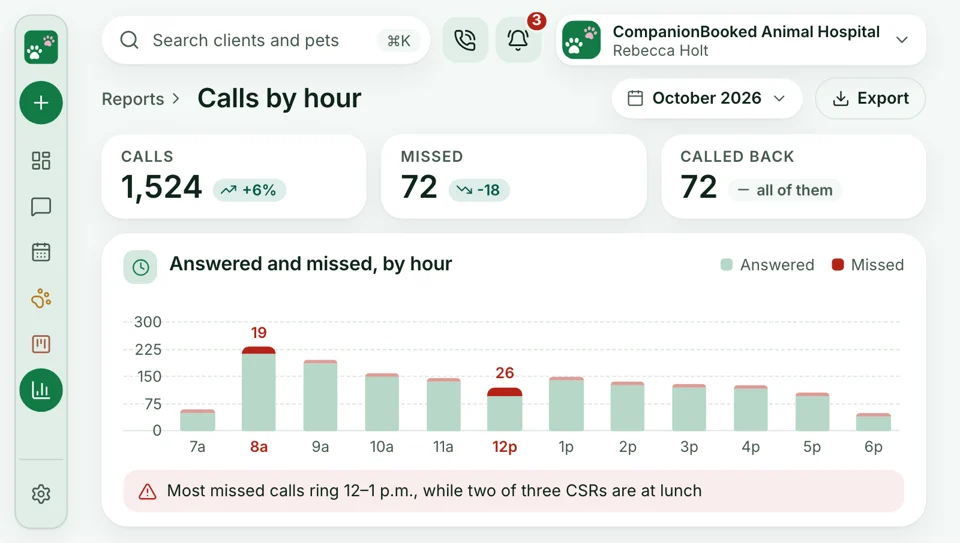
At 8 a.m. the phones ring nonstop, and by noon nobody knows how many calls went unanswered. Now every call is counted as answered, missed or called back. You see the hour the desk falls behind, and you can move a lunch break or add a CSR to it.
- Calls listed as answered, missed or returned, by day.
- AI receptionist calls come with a transcript and short summary.
Ad spend
New clients, ad by ad
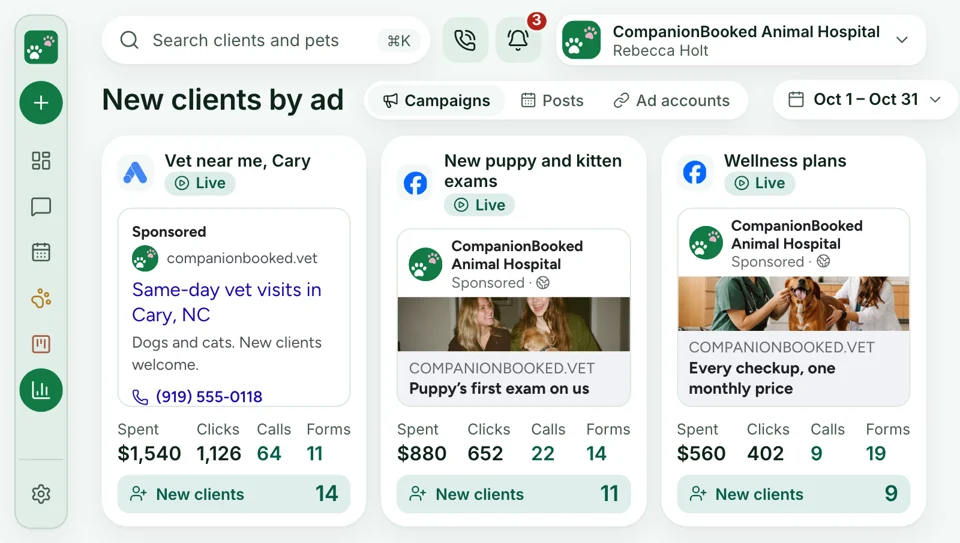
The practice pays for Google and Facebook ads every month, and the only sign they work is a pet parent saying they saw you online. Now every campaign carries a tracking number and booking link of its own. Each call, online booking and new client ties back to one ad, and our team moves budget toward what works.
- Every campaign lists what it brought: calls, bookings, new clients.
- Monthly results sit beside what the campaign cost.
First call
Who sent today's first caller
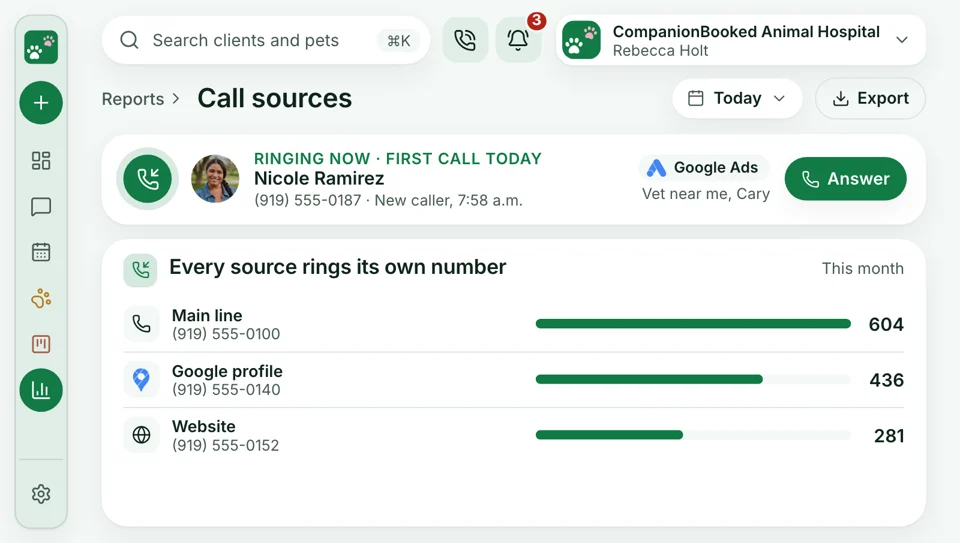
A pet parent new to the practice calls, and the CSR asks what brought them in. "Online," they say, and that goes in the notes if the line isn't too busy. Now each ad, the website and your Google profile carry their own number, so every call is tagged by source before anyone picks up.
- A different number on each listing, page and ad.
- Every tracking number rings the same front desk.
Recall
Reminders, counted to visits
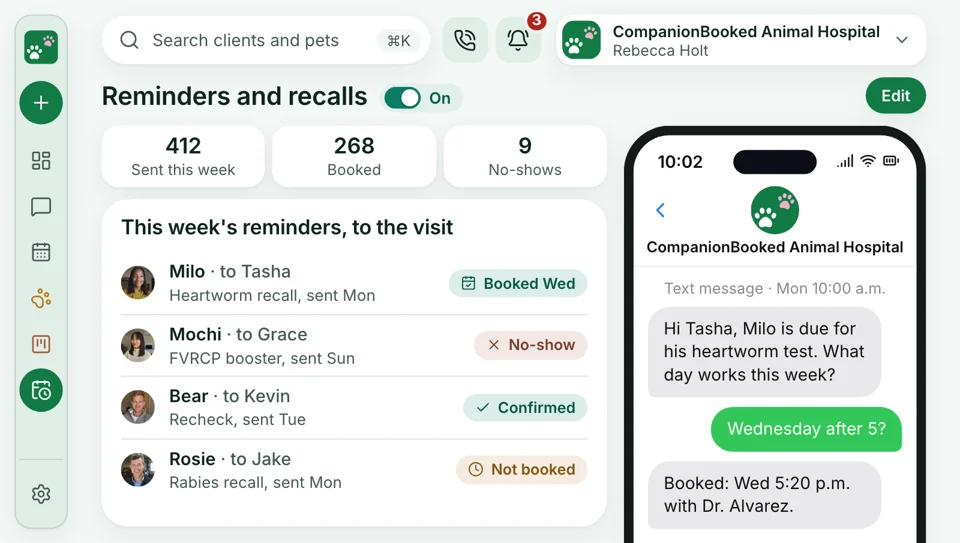
Hundreds of reminders go out each week, and the owner hears a guess that two-thirds book. Now each reminder is followed to the visit it booked, with confirmations and no-shows beside it, so a slipping week shows up early.
- Reminders show sent, booked or still open, per pet and per week.
- Missed appointments by type, week over week.
Reputation
Reviews
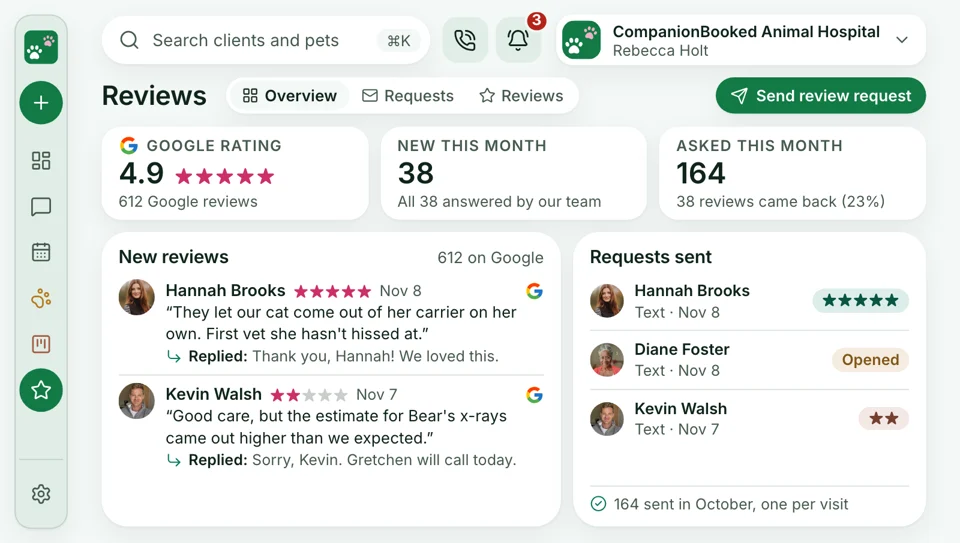
The owner checks Google once a month and finds a two-star review from three weeks ago with no reply. Now the dashboard shows every request sent, every review posted and your rating by month, and our team has already replied to each one for your practice.
- Review requests sent, reviews posted and rating, month by month.
- Each review, good or bad, gets a reply from us.


Also counted
- Call recordings to review
- Bookings by day and type
- Review counts
- Payments by day, deposit and plan
- Weekly new-client count
- A dashboard login for your manager
Reports that cover the whole plan
Reporting counts your phones, texting, booking and payments, plus the site and the marketing we run for you. All three come in one monthly plan, priced on a 30-minute call.

Reporting Reminder results, missed calls, ad sources and reviews, with a report each month.
This pageCounted in reports
- Phones Every call counted, answered or missed, hour by hour.
- Websites The site we build you, with every online booking counted.
- SEO & AI Search Search traffic and calls from Google, counted monthly.
- Google & Facebook Ads Campaigns our team runs, tracked call by call. Your practice pays its ad spend straight to the ad platforms.
- Reminders Vaccine and wellness reminders, counted from text to booked visit.
- Direct Booking Online bookings, counted by source and by day.
- Google Reviews Requests sent, reviews posted and the replies we write, counted each month.
See last month's numbers at your next meeting
Bring the questions your owner asks each month to the demo, and we'll show the dashboard and report we'd build. Month to month, no setup fee, live in 14 days.


Heard at month end

Ryan D.Owner, Fenby 38%recalls bookedI used to ask if the reminders worked and get a shrug. Now I see the visits they booked.

Marisol W.CSR, Bayside 60%fewer missed calls at lunchMost missed calls came between 12 and 1. We moved one lunch break, and that hour is covered now.

Desmond N.DVM, Oakmont $1,800/momoved to the ad that workedWe paid for two ad campaigns. The report showed one brought nearly every new client, so we cut the other.

Alana K.Manager, Oaks Half as manydental no-showsNo-shows were a feeling before. Now I see them by day, and confirmation texts cut them in half.

Rohan S.Head CSR, Linden 5 minto catch up on the monthThe monthly report takes me five minutes, and I bring its call numbers to our desk huddle.

Jamie R.Ops lead, Birch 0 hoursbuilding reportsI pulled the owner's report from three logins. Now it's waiting when the month turns over.


Report FAQs
The numbers, and what they cover
The monthly report and call tracking get asked about most.
6 questions
Which monthly reports matter?
Most owners track five numbers: calls answered and missed, reminders that became visits, no-shows, new clients by source, and reviews. Your dashboard tracks each one, and our monthly report explains what moved.
Can I see which ads and calls brought in new clients?
Yes. Every ad and listing shows a different number to call, and each call, booking and new client is credited to where it started. You can see it by week or by month.
Reminder and no-show results?
Yes, there's a report for each: reminders, confirmation texts and no-shows. For every reminder sent, the dashboard shows whether the pet parent booked, and for every confirmation text, whether they confirmed, rescheduled or never replied. No-shows are counted by day and appointment type, so the gaps are easy to spot. Our monthly report compares them with last month and names one change to try.
Do I need to ask for reports?
No, the report arrives without anyone asking for it. At the start of each month our team sends it in plain English: what changed, what worked and what we'd try next. The dashboard is open any day you want more.
Does it show revenue?
Yes, for payments taken through CompanionBooked. Deposits, pay links and wellness plan payments show by day and type, and a new client's payments sit next to the ad or source that brought them.
Reports for each location?
Yes. Each location has its own dashboard with its own calls, bookings and reminders, and our monthly report puts every location side by side.
Common searches
Ask about reports
Got a reporting or tracking question? Dana reads sales@companionbooked.com and writes back.
Dana WhitfieldAccount manager
Request a demo